Select the green area to jump to the corresponding section.
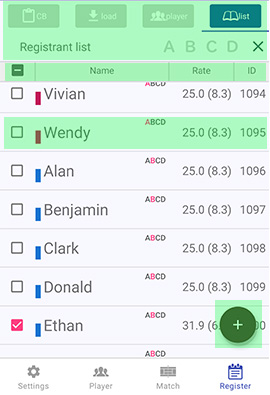
Select the green area to jump to the corresponding section.
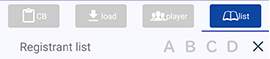
Select the data source for the Register. You can edit data by making selections here and performing actions on the displayed list.
list
Displays the data from the Register. Select this to correct or delete existing entries in the Register.
player
Displays players currently in the event. While you can edit players on the Player screen, this view is useful for editing them as a group. Some operations, like deleting a player from the Register, can only be performed here.
load
Loads and displays the Register from a saved cloud backup. This only loads the Register and does not affect current event players or match data. The main Register is not updated until you perform an action on the loaded data. An error will occur if no saved data is found.
CB
CB stands for Clipboard. You can import a list of names from newline-delimited text. This is useful for quickly adding many names to the Register at once. It also supports a special format for importing data that was exported using the 'Share' button on this screen. This allows you to import players with all their attributes, like rating and gender.
A B C D
Players can be assigned to groups (A, B, C, D). You can filter the list to show only players from specific groups. If no group is selected, all players are shown.

This is the header for the data list. You can tap it to sort the data or select all entries.
Checkbox
Toggles between selecting and deselecting all players in the list.
Name
Rate
ID
Tap this area to sort. Tapping cycles through ascending and descending order. The default sort order is by ID (the order of registration).

Displays the data for a single player. Tap an entry to open the edit dialog at the bottom of the screen.
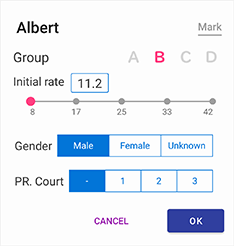
Checkbox
Toggles the selection for this player.
Gender
The colored square indicates gender (Blue: Male, Red: Female). It is hidden if the gender is "Unknown".
Name
Displays the player's name, which must be unique in the Register.
Mark
A visual marker displayed on the Player and Match screens.
ABCD
Shows the player's assigned group(s).
Rating
Displays the player's current rating. This is always shown here, even if disabled in the main settings.
User ID
A unique serial number assigned to each player in the Register. New players get the next available number. Deleted IDs are not reused.

This button opens a submenu with actions for the selected player(s).
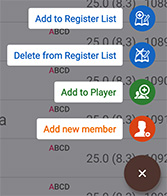
Add to Register List
Adds or updates the selected players in the Register. This is for data imported from the Player list or Clipboard.
Delete from Register List
Deletes the selected players from the Register.
Add to Player
Adds the selected players to the current event on the Player screen. Already added players are ignored.
Add new member
Adds a new, empty player entry to the Register. You can set their attributes after adding them.